emsarray.transect#
This module provides methods for extracting and plotting data
along transects through your datasets.
A transect path is represented as a shapely.LineString.
Data along the transect can be extracted in to a new xarray.Dataset,
or plotted using Transect.make_artist().
Currently it is only possible to take transects through grids with polygonal geometry. Taking transects through other kinds of geometry is a planned future enhancement.
Examples#
Transects#
These classes find the intersection of a shapely.LineString with a dataset
and provide methods to introspect this intersection, plot data along this path,
and extract data along this path.
- class emsarray.transect.Transect(dataset, line, *, grid=None)#
- dataset#
The dataset to plot a transect through
- line#
The transect path to plot
- grid#
The dataset grid to transect.
- property intersection_bounds#
A numpy array of shape (len(segments), 2) indicating the distance to the start and end of each intersection segment. This is a shortcut to
TransectSegment.start_distanceandend_distancefromTransect.segments.
- property linear_indexes#
A numpy array of length len(segments) of the linear indexes of each intersecting polygon, in order. This is a shortcut to
TransectSegment.linear_indexfromTransect.segments.
- property holes#
An array with the index of any discontinuities in the transect segments. For transect paths that are entirely within the dataset geometry this will be empty. For paths that pass in and out of the dataset geometry this will be the index of the segment just after the discontinuity. Two segments are not contiguous if segment[n].end_distance != segment[n+1].start_distance
- property points#
A list of
TransectPoints, one for each point in the transectline.
- property segments#
A list of
TransectSegmentsfor each intersecting segment of the transect line and the dataset geometry. Segments are listed in order from the start of the line to the end of the line.
- property coordinates#
A
xarray.Datasetcontaining coordinate information for data extracted along the transect.
- distance_along_line(point)#
Calculate the distance in metres that the point falls along the
transect line. If the point is not on the line, the point is projected on to the line and the distance is calculated to this point instead.This can be used to calculate the distance along the transect line to landmark features. These landmark features can be added as tick points along the transect. The landmark features need not fall directly on the line.
- Parameters:
point (
shapely.Point) – The point to calculate the distance to- Returns:
float– The distance the point is along the line in meters. If the point does not fall on the line, the point is first projected to the line.
- extract(data_array)#
Extract data from a data array along a transect.
- Parameters:
data_array (
data array or name) – The data array to extract data from.- Returns:
xarray.DataArray– A newxarray.DataArraycontaining data from the input data array extracted along the path of the transect.
- make_artist(axes, data_array, **kwargs)#
Make an artist to plot values extracted from a data array along this transect. The kind of artist used depends on the dimensionality of the data array.
To be plotted along a transect the data array must be defined on a supported grid. Currently only polygonal grids are supported.
If a data array has a depth axis,
make_cross_section_artist()is called, otherwisemake_transect_step_artist()is called.- Parameters:
axes (
Axes) – Thematplotlib.axes.Axesto add this artist to.data_array (
data array or name) – The data array to plot**kwargs – Passed on to the artist, can be used to customise the plot style.
- Returns:
artists.TransectArtist– The artist that will plot the data. This artist will already have been added to the axes.
- make_cross_section_artist(axes, data_array, colorbar=True, **kwargs)#
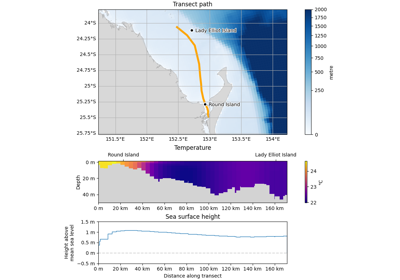
Make an artist that plots a vertical slice along the length of the transect. The data must be three dimensional with a depth axis. The data are plotted as a grid of values, with distance along the transect as the x-axis and depth represented as the y-axis.
- Parameters:
axes (
Axes) – Thematplotlib.axes.Axesto add this line to.data_array (
data array or name) – The data array to plot. This data array must be defined on a polygonalGridand must have a depth coordinate with bounds.colorbar (
bool, defaultTrue) – Whether to add a colorbar for this artist. Sensible defaults are used for the colorbar, but if more customisation is required set colorbar=False and configure a colorbar manually.edgecolor (
color, optional) – The colour of the line. Optional, defaults to the next available colour in the matplotlib plot colours.fill (
bool, defaultFalse) – Whether to fill in values between the line and the baseline. Defaults to False.**kwargs – Passed on to the
TransectStepArtist, can be used to customise the plot.
See also
setup_distance_axis()Setup the x-axis of an
Axesfor plotting distance along a transect.setup_depth_axis()Setup the y-axis of an
Axesfor plotting down a depth coordinate.estimate_bounds_1d()Estimate some bounds for a coordinate variable.
- make_transect_step_artist(axes, data_array, edgecolor='auto', fill=False, **kwargs)#
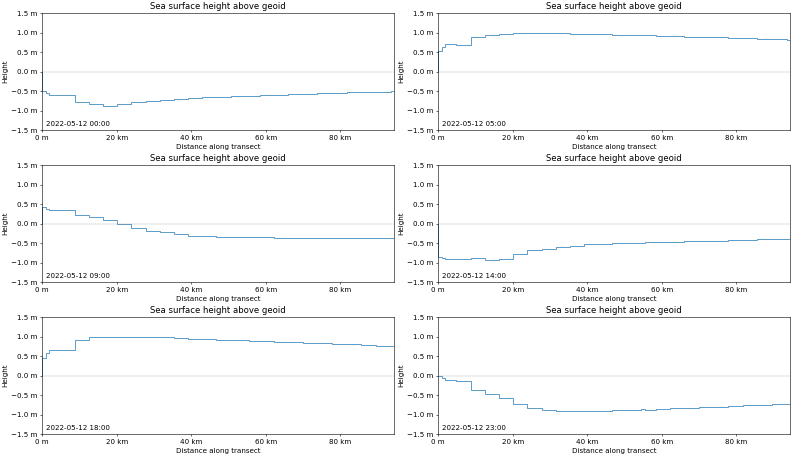
Make an artist that plots values along the length of the transect. The data must be two dimensional - it must have no depth axis. The data are plotted as a stepped line.
- Parameters:
axes (
Axes) – Thematplotlib.axes.Axesto add this line to.data_array (
data array or name) – The data array to plot. This data array must be defined on a polygonalGridand must not have any other dimensions such as time or depth.edgecolor (
color, optional) – The colour of the line. Optional, defaults to the next available colour in the matplotlib plot colours.fill (
bool, defaultFalse) – Whether to fill in values between the line and the baseline. Defaults to False.**kwargs – Passed on to the
TransectStepArtist, can be used to customise the plot.
- Returns:
TransectStepArtist– The artist that will plot the data. This artist will already have been added to the axes.
See also
utils.setup_distance_axis()Setup the x-axis of an
Axesfor plotting distance along a transect.
- make_ocean_floor_artist(axes, data_array, fill=True, facecolor='lightgrey', edgecolor='none', baseline=None, **kwargs)#
Make an artist that renders a solid polygon following a bathymetry variable. This can be drawn in front of a cross section artist to mask out values below the ocean floor.
- Parameters:
axes (
Axes) – Thematplotlib.axes.Axesto add the ocean floor artist todata_array (
data array or name) – The data array or name of a data array with the ocean floor databaseline (
float, optional) – The deepest part of the ocean floor to render. The ocean floor will be filled in from the bathymetry value down to the baseline. Optional, if not provided the deepest value in the data array is used instead.**kwargs – Passed on to the
artists.TransectStepArtistfor styling. Set facecolor to change the colour of the ocean floor polygon.
- Returns:
artists.TransectStepArtist– The artist that will render the ocean floor. This artist will already have been added to the axes.
Notes
The sign convention of the bathymetry variable and the depth coordinate must match. If they differ the ocean floor polygon is likely to be either entirely outside of the plot extent or to cover the entire plot extent.
normalize_depth_variables()can be used to change the sign convention of a depth coordinate variable.See also
- CF Conventions on Vertical Coordinates
More information on the positive attribute.
emsarray.operations.depth.normalize_depth_variables()Update the sign convention of a depth coordinate variable.
- class emsarray.transect.TransectPoint#
A TransectPoint holds information about each vertex along a transect path.
- point#
The original point, in the CRS of the line string / dataset.
- crs#
An AzimuthalEquidistant CRS centred on this point.
- distance_metres#
The distance in metres of this point along the line.
- distance_normalised#
The projected distance along the line of this point. This is normalised to [0, 1]. The actual value is meaningless but can be used to find the closest vertex on the line string for any other projected point.
- class emsarray.transect.TransectSegment#
A TransectSegment holds information about each intersecting segment of the transect path and the dataset cells.
- start_point#
The point where the transect path first intersects this dataset cell
- end_point#
The point where the transect exits this dataset cell
- intersection#
The entire intersection between the transect path and this dataset cell
- start_distance#
The distance along the line in metres to the
start_point
- linear_index#
The linear index of this dataset cell
- polygon#
The polygon of the dataset cell
Artists#
These classes plot data along a transect.
Transect artists are normally created by calling Transect.make_artist().
- class emsarray.transect.artists.TransectArtist#
A matplotlib Artist subclass that knows what Transect it is associated with, and has a set_data_array() method. Users can call TransectArtist.set_data_array() to update the data in a plot. This is useful when making animations, for example.
- set_data_array(data_array)#
Update the data this artist is plotting.
- class emsarray.transect.artists.CrossSectionArtist#
- classmethod from_transect(transect, *, data_array=None, depth_coordinate=None, **kwargs)#
Construct a
CrossSectionArtistfor a transect.
- class emsarray.transect.artists.TransectStepArtist#
- classmethod from_transect(transect, *, data_array=None, **kwargs)#
Construct a
TransectStepArtistfor a transect.
Utilities#
- emsarray.transect.plot(dataset, line, data_array, *, figsize=(12, 3), title=None, bathymetry=None, landmarks=None, **kwargs)#
Display a transect or cross section of a dataset along a path.
This is convenience function that handles the most common use cases. For more control over the figure, see the comprehensive transect example.
- Parameters:
dataset (
xarray.Dataset) – The dataset to transect.line (
shapely.LineString) – The transect path to plot.data_array (
data array or name) – A variable from the dataset to plot.title (
str, optional) – The title of the plot. If None a title is pulled from the data array usingmake_plot_title().bathymetry (
data array or name) – Used to draw an ocean floor polygon over the cross section. Only used if the data array to plot has a depth dimension.landmarks (
listofLandmark) – Landmarks to add to the top axis of the plot. These can help viewers locate the transect in space.**kwargs – Passed to
Transect.make_artist().
- emsarray.transect.setup_distance_axis(transect, axes)#
Configure the x-axis of a
Axesfor values along a transect.- Parameters:
transect (
emsarray.transect.Transect) – The transect being plottedaxes (
matplotlib.axes.Axes) – The axes to configure
- emsarray.transect.setup_depth_axis(transect, axes, data_array=None, depth_coordinate=None, ylim=True, label=True, units=True)#
Configure the y-axis of a
Axesfor values along a depth coordinate.- Parameters:
transect (
emsarray.transect.Transect) – The transect being plottedaxes (
matplotlib.axes.Axes) – The axes to configuredata_array (
data array or name, optional)depth_coordinate (
data array or name, optional) – One of data_array or depth_coordinate must be provided. The y-axis is configured to show values along this depth coordinate. If data_array is provided, the depth coordinate for this data array is used.ylim (
tupleoffloat,float, optional) – The ylim of the axes. If not provided the limit is calculated from the depth coordinate.label (
strorNone, optional) – The label for the y-axis. Optional, defaults to the long_name attribute of the depth coordinate. Set to None to disable the label.units (
strorNone, optional) – The units for the y-axis. Optional, defaults to the units attribute of the depth coordinate. Set to None to disable the units and formatting of tick labels.