emsarray.plot#
Plotting an entire figure#
The plot_on_figure() and animate_on_figure() functions
will generate a simple plot of any supported variables.
These functions are intended as quick and simple ways of exploring a dataset
and have limited customisation options.
The examples section contains many worked examples on how to generate plots with more customisations. Plot with specified data limits is a good place to start.
Shortcuts#
These functions will generate an entire plot, but have limited customisation options.
- emsarray.plot.plot_on_figure(figure, convention, *variables, title=None, projection=None, landmarks=None, gridlines=True, coast=True)#
Plot a
DataArrayon amatplotlibFigure.This method is a shortcut for quickly generating simple plots. It is not intended to be fully featured. See the examples for more comprehensive plotting examples.
- Parameters:
figure – The
Figureinstace to plot on.convention – The
Conventioninstance of the dataset. This is used to build the polygons and vector quivers.*variables (
xarray.DataArrayortuplesofxarray.DataArray) – Any number of dataset variables to plot. Scalar variables should be passed in directly, while vector pairs should be passed in as a tuple. These will be passed toConvention.make_artist().scalar (
xarray.DataArray, optional) – The data to plot as anxarray.DataArray.Deprecated since version 1.0.0: Pass in variables as positional arguments instead
vector (
tupleofnumpy.ndarray, optional) – The u and v components of a vector field as a tuple ofxarray.DataArray.Deprecated since version 1.0.0: Pass in variables as positional arguments instead
title (
str, optional) – The title of the plot. Optional.projection (
Projection) – The projection to use when plotting. Optional, defaults toPlateCarree. This is different to the coordinate reference system for the data, which is defined inConvention.data_crs.landmarks (
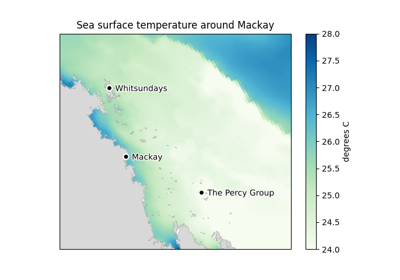
listoflandmarks, optional) – Landmarks to add to the plot. These are tuples of (name, point).gridlines (
bool, defaultTrue) – Whether to add gridlines to the plot usingadd_gridlines().coast (
bool, defaultTrue) – Whether to add coastlines to the plot usingadd_coast().
- emsarray.plot.animate_on_figure(figure, convention, coordinate, *variables, title=None, projection=None, landmarks=None, gridlines=True, coast=True, interval=1000, repeat=True)#
Plot a
xarray.DataArrayon amatplotlibFigureas aFuncAnimation.This method is a shortcut for quickly generating simple plots. It is not intended to be fully featured. See the examples for more comprehensive plotting examples.
- Parameters:
figure (
matplotlib.figure.Figure) – TheFigureinstace to plot on.convention – The
Conventioninstance of the dataset. This is used to build the polygons and vector quivers.coordinate (
xarray.DataArray) – The coordinate values to vary across frames in the animation.*variables (
xarray.DataArrayortuplesofxarray.DataArray) – Any number of dataset variables to plot. Scalar variables should be passed in directly, while vector pairs should be passed in as a tuple. These will be passed toConvention.make_artist().scalar (
xarray.DataArray, optional) – The data to plot as anxarray.DataArray.Deprecated since version 1.0.0: Pass in variables as positional arguments instead
vector (
tupleofnumpy.ndarray, optional) – The u and v components of a vector field as a tuple ofxarray.DataArray.Deprecated since version 1.0.0: Pass in variables as positional arguments instead
title (
strorcallable, optional) – The title for each frame of animation. Optional, will default to the coordinate value for each frame.If this is a string,
str.format()will be called with the coordinate value for each frame.If this is a callable, it will be called with the coordinate value for each frame, and it should return a string for the title.
projection (
Projection) – The projection to use when plotting. Optional, defaults toPlateCarree. This is different to the coordinate reference system for the data, which is defined inConvention.data_crs.landmarks (
listoflandmarks, optional) – Landmarks to add to the plot. These are tuples of (name, point).gridlines (
bool, defaultTrue) – Whether to add gridlines to the plot usingadd_gridlines().coast (
bool, defaultTrue) – Whether to add coastlines to the plot usingadd_coast().interval (
int) – The interval between frames of animationrepeat (
{True, False, 'cycle', 'bounce'}) – Whether to repeat the animation or not.Trueand'cycle'will play the animation on loop forever.'bounce'will play the animation forward, then backward, then repeat.Falsewill play the animation once then stop.
- Returns:
Shortcuts#
These functions make common plotting operations simple. They are designed as quick shortcuts and aim for ease of use and simplicity over being fully featured. Most of these functions defer to other parts of matplotlib or cartopy for the actual implementation, and users are encouraged to call these underlying implementations directly if more customisation is required.
- emsarray.plot.add_coast(axes, **kwargs)#
Add coastlines to an
Axes. Some default styles are applied: the land polygons are light grey and semi-transparent, and the coastlines are opaque dark grey.This uses the
GSHHS coastline featurewhich provides a reasonably accurate, reasonably detailed coast line for large scale models. Plots of smaller regions may find the resolution not suitable and may need to source a more detailed coastline shape from elsewhere.- Parameters:
axes (
matplotlib.axes.Axes) – The axes to add the coastline tokwargs – Passed to
GeoAxes.add_feature().
- emsarray.plot.add_gridlines(axes, **kwargs)#
Add a
Gridlinerto the axes including gridlines and with tick labels on bottom and left sides. For all available options consult the cartopyGridliner documentation.- Parameters:
axes (
matplotlib.axes.Axes) – The axes to add the gridlines to.kwargs – Passed to
GeoAxes.gridlines().
- Returns:
- emsarray.plot.add_landmarks(axes, landmarks, color='black', outline_color='white', outline_width=2)#
Place some named landmarks on a plot.
- Parameters:
axes (
matplotlib.axes.Axes) – The axes to add the landmarks to.landmarks (
listoflandmarks) – The landmarks to add. These are tuples of (name, point).color (
str, default'black') – The color for the landmark marker and labels.outline_color (
str, default'white') – The color for the outline. Both the marker and the labels are outlined.outline_width (
ind, default2) – The linewidth of the outline.
Examples
Utilities#
- emsarray.plot.polygons_to_collection(polygons, **kwargs)#
Convert a list of
shapely.Polygoninstances to a matplotlibPolyCollection.- Parameters:
polygons (
iterableofshapely.Polygon) – The polygons for the poly collection**kwargs (
Any) – Keyword arguments to pass to the PolyCollection constructor.
- Returns:
matplotlib.collections.PolyCollection– A PolyCollection made up of the polygons passed in.
- emsarray.plot.bounds_to_extent(bounds)#
Convert a Shapely bounds tuple to a matplotlib extents.
A Shapely bounds is a tuple of (min x, min y, max x, max y), while a Matplotlib extent is a list of (min x, max x, min y, max y).
Example
import cartopy.crs as ccrs
import matplotlib.pyplot as plt
from emsarray.plot import bounds_to_extent
from shapely.geometry import Polygon

polygon = Polygon([
    (148.30, -40.75), (146.47, -41.19), (144.67, -40.62),
    (146.05, -43.53), (146.87, -43.60), (148.30, -40.75),
])
figure = plt.figure(figsize=(10, 8), dpi=100)
axes = plt.subplot(projection=ccrs.PlateCarree())
axes.set_extent(bounds_to_extent(polygon.buffer(0.1).bounds))
- emsarray.plot.make_plot_title(dataset, data_array)#
Make a suitable plot title for a variable. This will attempt to find a name for the variable by looking through the attributes. If the variable has a time coordinate, and the time coordinate has a single value, the time step is appended after the title.
- Parameters:
dataset (
xarray.Dataset) – A dataset.data_array (
xarray.Dataset) – A data array from the dataset, or one of compatible shape.
- Returns:
title (
str) – A suitable title for a plot of this data array.
See also
Artist functions#
These functions will make a matplotlib Artist
that can plot variables directly from a support emsarray dataset.
These functions and the associated artists can be imported from
emsarray.plot.artists.
- emsarray.plot.artists.make_polygon_scalar_collection(axes, grid, data_array=None, add_colorbar=None, **kwargs)#
Make a
PolygonScalarCollectionfor aGridandDataArraywith some sensible defaults.- Parameters:
axes (
matplotlib.axes.Axes) – The axes to add the artist togrid (
emsarray.conventions.Grid) – The grid containing the geometry to plot on.data_array (
xarray.DataArrayorNone) – The data array to plot. Optional, will plot just the geometry if None.add_colorbar (
boolorNone, defaultNone) – Whether to add a colorbar. Will add a colorbar by default if a data array is supplied.kwargs (
Any) – Extra kwargs for styling the PolygonScalarCollection. Seematplotlib.collections.PolyCollectionfor valid options.
- Returns:
- emsarray.plot.artists.make_polygon_vector_quiver(axes, grid, data_array=None, **kwargs)#
Make a
PolygonVectorQuiverfor aGridandDataArraywith some sensible defaults.- Parameters:
axes (
matplotlib.axes.Axes) – The axes to add the artist togrid (
emsarray.conventions.Grid) – The grid containing the geometry to plot on.data_array (
tupleof(xarray.DataArray,xarray.DataArray)orNone) – The data arrays to plot. Optional, will make some zero length arrows if not set.kwargs (
Any) – Extra kwargs for styling the PolygonVectorQuiver Seematplotlib.collections.Quiverfor valid options.
- Returns:
- emsarray.plot.artists.make_polygon_contour(axes, grid, data_array, add_colorbar=True, **kwargs)#
Make a
tricontour()plot through the centres of a polygon grid. This is a wrapper around making aPolygonTriContourSet.- Parameters:
axes (
matplotlib.axes.Axes) – The axes to add the artist togrid (
emsarray.conventions.Grid) – The grid containing the geometry to plot on.data_array (
xarray.DataArrayorNone) – The data array to plot.add_colorbar (
bool, defaultTrue) – Whether to add a colorbar.kwargs (
Any) – Extra kwargs for styling the PolygonTriContourSet. Seematplotlib.tri.TriContourSetfor valid options.
- Returns:
- emsarray.plot.artists.make_node_scalar_artist(axes, grid, data_array=None, *, add_colorbar=None, **kwargs)#
Make a
NodeTriMeshfor aGridandDataArraywith some sensible defaults.- Parameters:
axes (
matplotlib.axes.Axes) – The axes to add the artist togrid (
emsarray.conventions.Grid) – The grid containing the geometry to plot on.data_array (
xarray.DataArray) – The data array to plot.add_colorbar (
bool, defaultTrue) – Whether to add a color bar to the plot.kwargs (
Any) – Extra kwargs for styling the NodeTriMesh Seematplotlib.collections.TriMeshfor valid options.
- Returns:
Artists#
- class emsarray.plot.artists.GridArtist#
A matplotlib Artist subclass that knows what Grid it is associated with, and has a set_data_array() method. Users can call GridArtist.set_data_array() to update the data in a plot. This is useful when making animations, for example.
- set_data_array(data_array)#
Update the data this artist is plotting. The data array must be defined on the same
grid, and must not have any extra dimensions such as depth or time.
- class emsarray.plot.artists.PolygonScalarCollection(verts, sizes=None, *, closed=True, **kwargs)#
A
GridArtistwrapper around aPolyCollection. This artist can plot scalar variables on grids with polygonal geometry.- classmethod from_grid(grid, data_array=None, **kwargs)#
Create a PolygonScalarCollection for a particular polygon grid of a dataset.
- Parameters:
grid (
emsarray.conventions.Grid) – The grid to make the polygon collection fordata_array (
xarray.DataArray) – A data array, defined on the grid, with data to plot. Optional, if not provided the polygons will be empty.
- Returns:
- class emsarray.plot.artists.PolygonVectorQuiver(ax, *args, scale=None, headwidth=3, headlength=5, headaxislength=4.5, minshaft=1, minlength=1, units='width', scale_units=None, angles='uv', width=None, color='k', pivot='tail', **kwargs)#
- classmethod from_grid(axes, grid, data_array=None, **kwargs)#
Create a PolygonVectorQuiver for a particular polygon grid of a dataset.
- Parameters:
grid (
emsarray.conventions.Grid) – The grid to make the quiver fordata_array (
tupleof(xarray.DataArray,xarray.DataArray)orNone) – A data arrays, defined on the grid, with data to plot.
- Returns:
- class emsarray.plot.artists.PolygonTriContourSet(axes, triangulation, data_array, grid, **kwargs)#
- classmethod from_grid(axes, grid, data_array, **kwargs)#
Create a PolygonTriContourSet for a particular polygon grid of a dataset.
- Parameters:
grid (
emsarray.conventions.Grid) – The grid to make the tricontour fordata_array (
xarray.DataArray) – A data array, defined on the grid, with data to plot.kwargs (
Any) – Extra kwargs to configure the artist. Seematplotlib.tri.TriContourSetfor valid options.
- Returns:
- class emsarray.plot.artists.NodeTriMesh(triangulation, **kwargs)#
A
GridArtistwrapper aroundTriMeshthat can plot on the vertices of a dataset triangulation.- classmethod from_grid(grid, data_array=None, **kwargs)#
Create a NodeTriMesh for a particular node grid of a dataset.
- Parameters:
grid (
emsarray.conventions.Grid) – The grid to make the trimesh fordata_array (
xarray.DataArray) – A data array, defined on the grid, with data to plot.
- Returns: